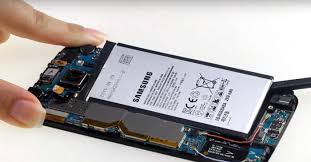
How Long Do Phone Batteries Last?
Lithium-ion batteries degrade with every charge cycle. Most phone batteries last 300–500 full charge cycles before dropping below 80% capacity. In real-world terms, that's typically 2–3 years for heavy users and 3–4 years for lighter users.
Below 80% capacity, you'll notice the drop: your phone that used to last all day now needs a charge by noon. At 70% you'll likely need to charge it twice a day. At 60% or below, the battery may start causing random shutdowns and triggering performance throttling.
Sign 1: Battery Drains Dramatically Faster Than It Used To
This is the most common sign and the easiest to notice. If your phone used to last a full day on a charge and now needs charging by mid-afternoon doing the same things, your battery capacity has degraded.
How to check on iPhone: Settings → Battery → Battery Health & Charging. Apple shows your "Maximum Capacity" percentage. Below 80% is when Apple recommends replacement; below 70% you'll notice significant daily impact.
How to check on Android: Dial *#*#4636#*#* on many Samsung and Android phones to access a battery info screen. Third-party apps like AccuBattery also show real cycle count and wear level.
Sign 2: Phone Shuts Down Randomly Before Reaching 0%
If your phone turns off when the battery shows 20%, 30%, or even 50%, the battery's cells have degraded unevenly. The battery is lying about its capacity — it can't actually deliver the power it claims to have, so the phone cuts out suddenly under load (like when the screen brightness peaks, you take a photo, or you open a demanding app).
This is why Apple introduced performance throttling — the phone voluntarily slows down to avoid the sudden shutdowns. If you've seen the "iPhone battery health significantly degraded" notification, this is what it's warning you about.
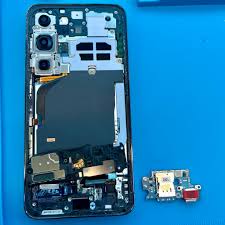
Sign 3: Your Screen Has a Gap or the Back is Bulging ⚠️
This is the one you cannot ignore. A swollen battery is a lithium battery that is off-gassing. As the battery degrades, it produces gas inside its sealed pouch. This gas has to go somewhere — so it pushes the battery outward, which lifts your screen away from the frame or bends your phone's back panel.
If you notice a gap between your screen and frame that wasn't there before, or your phone doesn't lay flat on a table, stop charging it immediately and bring it to a repair shop today. A ruptured swollen battery can cause a fire. This is not a wait-and-see situation.
Signs of a swollen battery:
- Phone no longer lies flat on a table — it rocks slightly
- Visible gap at the edge where the screen meets the frame
- Screen or back panel is visibly bulging
- Touch screen not responding normally near the edges (the swelling is pushing the display up)
Sign 4: Phone Gets Unusually Hot While Charging
Some warmth during charging is normal. But if your phone gets noticeably hot — too hot to hold comfortably — especially during overnight charging or light use, the battery is overworking. A degraded battery works harder to charge and discharge, generating more heat in the process.
Excessive heat also accelerates the battery degradation further, creating a feedback loop. Heat during charging that didn't used to happen is a reliable sign the battery has reached the end of its useful life.
Sign 5: The Battery Percentage Jumps Erratically
If your battery percentage jumps from 45% to 20% in a few minutes, or climbs from 80% to 95% while barely charging, the battery's cells can no longer accurately report their state of charge. This is called "calibration drift" and happens in old or significantly degraded batteries.
An erratic battery percentage makes the phone unreliable — you can never trust how much charge you actually have. This is compounded when the operating system makes bad decisions based on inaccurate battery readings.
How Much Does Battery Replacement Cost?
Battery replacement is one of the most cost-effective repairs you can do. Compare the options:
| Device | Fixtronics NYC | Apple / OEM Store | You Save |
|---|---|---|---|
| Android phones | From $49 | $79–$149 | $30–$100 |
| iPhone (most models) | From $59 | $99 | $40 |
| Samsung S-series | From $69 | $129–$179 | $60–$110 |
Most replacements take 30–45 minutes. Compare that to waiting weeks for an Apple Store appointment — and paying $40 more for the privilege.
Can You Extend Battery Life?
Some habits that slow battery degradation:
- Keep battery between 20–80% rather than constantly charging to 100%
- Avoid charging overnight — use optimized charging settings if available
- Don't let the phone get too hot (avoid leaving it in direct sun or a hot car)
- Use the original or a certified charger — cheap uncertified chargers can damage batteries
That said, all lithium batteries degrade regardless of how well you treat them. It's a chemistry reality, not a design flaw. A 3-year-old battery will need replacement eventually.
Battery issue? Replacement from $49 — done in 30 minutes
Fixtronics near Penn Station in Midtown Manhattan. Android battery from $49, iPhone from $59. Save up to $40 vs Apple Store. Walk-ins welcome — open 7 days.