Fix 1: Try a Different Cable
This sounds obvious, but it's the fix we forget first. Cables fail far more often than ports do. A cable that looks fine can have a broken wire inside, particularly at the ends near the connector where the cable bends repeatedly. Even an "official" cable can fail.
Borrow a cable from someone else — a friend, a colleague, a store. If the borrowed cable charges your phone, you found the problem. Replace the cable.
Note for iPhone users: Low-quality Lightning cables often trigger the "This accessory may not be supported" warning. Use a certified MFi cable or an Apple original.
Fix 2: Try a Different Charger Block
The wall adapter (the brick that plugs into the outlet) is almost as likely to fail as the cable. Try plugging into a different power source: a different wall adapter, a laptop USB port, a power bank, or a car charger. If any of these work, your original charger block is the issue.
Fix 3: Clean the Charging Port
Lint is the #1 cause of charging failures. Pockets are full of lint, and over time it gets packed tightly into the charging port until the cable can't make full contact. Shine a flashlight into the port and look — if you see dark fuzzy material, that's your problem.
The fix: use a wooden toothpick or a SIM eject tool to gently loosen and remove the lint. Don't use metal (it can bend pins) and don't blow air forcefully — compressed air can drive debris deeper in. Work gently around the edges, not straight in toward the back.
If you're not comfortable doing this yourself, any repair shop can clean it in minutes — it's usually free or $5. Don't use a paperclip or pin.
Fix 4: Restart the Phone
Software bugs can prevent the charging system from registering the cable. A full restart clears this. Power the phone completely off, wait 10 seconds, and turn it back on before connecting the charger.
For iPhones: A force restart (volume up, volume down, then hold the side button) clears more deeply than a standard restart and is worth trying.
Fix 5: Check the Cable Connection Quality
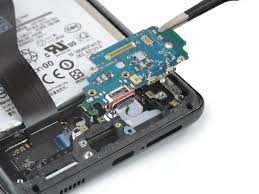
If your phone only charges when the cable is held at a specific angle, or if the cable wiggles in the port rather than clicking in firmly, the port connector pins have worn down. This is a hardware problem that a restart or cable swap won't fix — the port needs to be replaced.
But before concluding it's the port: try the cable in a different device. If the cable also wobbles in another phone's port, the cable head has worn out. If only your phone's port is loose, the port is the issue.
Fix 6: Check for a Software Charging Issue (Android)
Android phones sometimes develop a bug where the charging icon appears but the battery doesn't actually increase. Open a battery diagnostic app or watch the battery percentage while charging. If the percentage is stuck or dropping while plugged in, try:
- Clearing the battery stats cache (Settings → Battery → More → Reset)
- Booting into Safe Mode to check if a third-party app is interfering
- Checking if a recent OS update caused the problem (check forums for your device)
Fix 7: Try Wireless Charging (If Supported)
If your phone supports Qi wireless charging, place it on a wireless charger. If it charges wirelessly but not via cable, the charging port is confirmed as the problem. If wireless charging also fails, the battery or power management system is likely the issue. This test narrows down where the fault is before you pay for a repair.
Fix 8: Check for Heat Throttling
iPhones and some Android phones pause or slow charging when the device gets too hot — this is a battery protection feature. If your phone won't charge after heavy use or in a hot environment, let it cool down for 15 minutes at room temperature and try again. Remove the case while charging to improve heat dissipation.
When It's Time to See a Technician
If you've worked through all 8 fixes and your phone still won't charge, the problem is hardware — most likely one of these:
| Problem | Fixtronics Price | Turnaround |
|---|---|---|
| Charging port replacement | From $39 | 30–45 min |
| Battery replacement | From $49 | 30–45 min |
| Water damage / board cleaning | From $49 | Same-day |
| Power IC / board repair | Call for quote | 1–2 days |
At Fixtronics we offer free diagnostics — walk in, we'll test your phone and tell you exactly what's wrong before you commit to any repair.
Still not charging? Charging port repair from $39
Walk into Fixtronics near Penn Station in Midtown Manhattan. Free diagnosis — we'll tell you what's wrong before you pay anything. Same-day charging port and battery repairs.